Download official Avengers Spreadtrum Module 3.0 setup for Windows. Get direct download links, key features, and complete installation guide.
- What is the avengers spreadtrum module?
- How to install and use the avengers spreadtrum module?
- Images of the avengers spreadtrum module.
- What are the contents of the avengers spreadtrum module files?
- Additional information of the avengers spreadtrum module.
- Download link of avengers spreadtrum module.
What is the avengers spreadtrum module?
The Avengers Spreadtrum module is an SPD mobile devices software servicing program developed by the Avengers Box team and is compatible with all Windows operating systems. And this module has the ability to flash firmware, unlock FRP, network, and screen lock for mobile devices that use SPD (Spreadtrum) CPU. And SPD's CPU is mostly used in Chinese feature phones and smartphones and this module supports them. This program is not free. To use it you need an avenger box device or avengers dongle which can be connected to the computer to use this program. And once you connect the Avengers device to the computer and install and launch the program, you can perform a number of tasks below with this tool.Diag Mode Utils
- Enter Diag
- Power Off
- Read Phone Info
- Read Password
- Factory Reset - Wipe Phone
- Security NV Backup
- Restore NV Backup
- Connection Time [Small Timeout, Big Timeout]
- Diag Mode Mode1 [New Phones] Mode2 [Old Phones]
- Restart On Job Done
- Abort
- Help
Flash Mode Utils
- Select Model or Generic CPU
- Job (Boot-Info, Dump Full Flash, Write Full Flash, Make NVRAM Backup, Restore NVRAM Backup, Reset Phone EFS, Read Phone Password, Remove SIM-Lock)
- Repair IMEI (IMEI 1, IMEI 2) [NV/EFS]
- Set Storage Manually (NOR, NAND, EMMC)
- Manually Select Port
- Custom Loader
IMEI-SN-WIFI
- Enter Diag
- Power Off
- Read Info
- Write IMEI-SN-WIFI (IMEI 1, IMEI 2, IMEI 3, IMEI 4, BT, WIFI, SN)
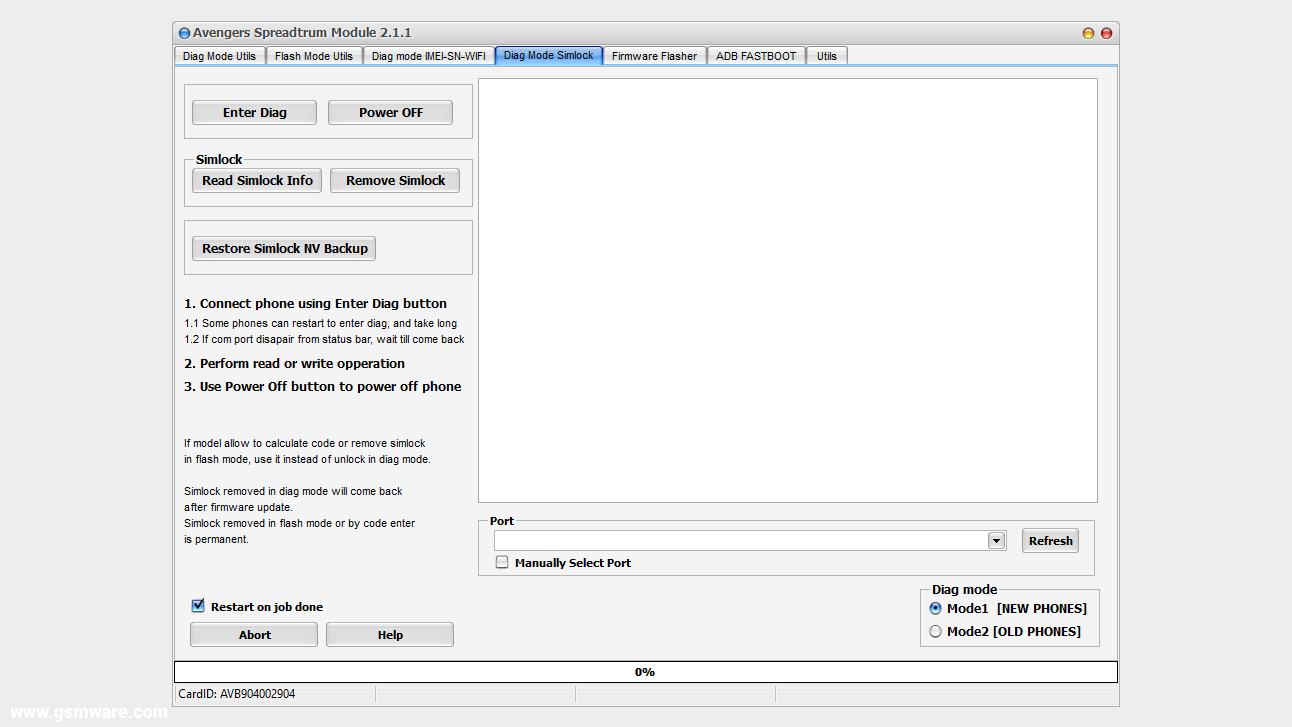
Simlock
- Enter Diag
- Power Off
- Read SIM Lock Info
- Remove SIM Lock
- Restore SIM Lock NV Backup
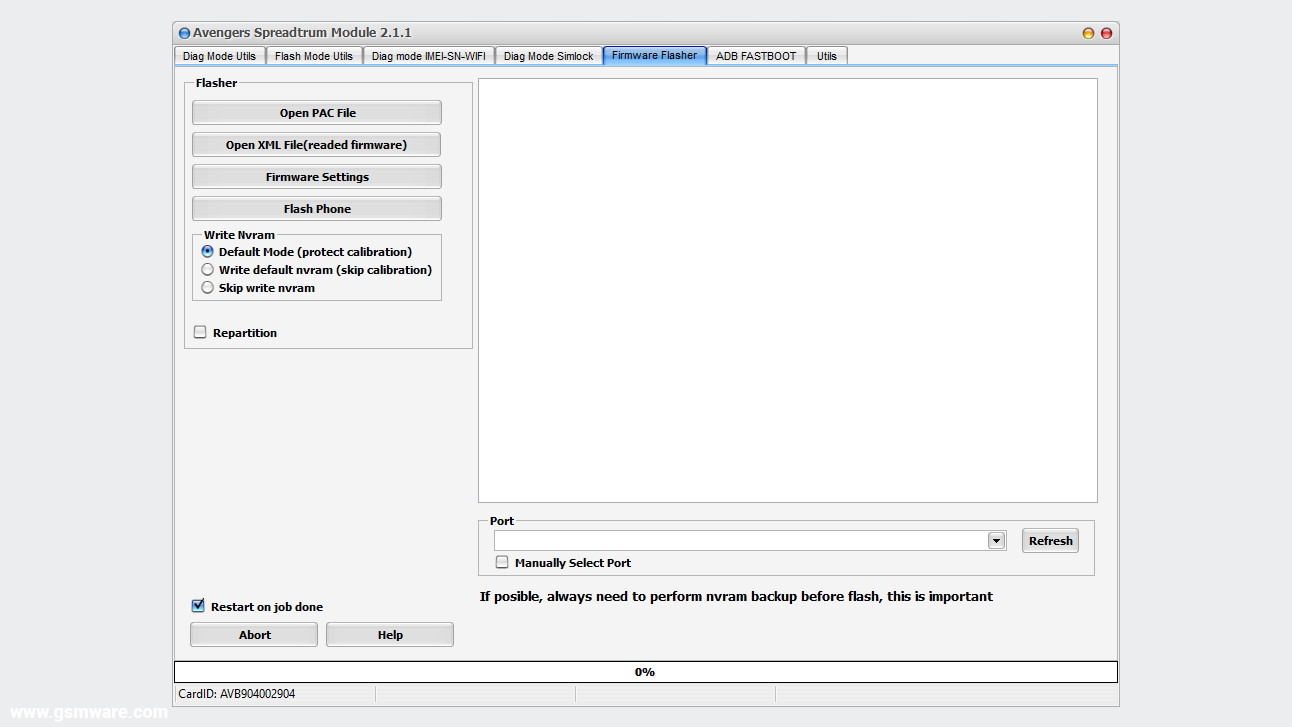
Pac Firmware Flasher
- Open PAC File
- Firmware Settings
- Flash Phone
- Write NVRAM (Default Mode - Protect Calibration, Write Default NVRAM - Skip Calibration, Skip Write NVRAM)
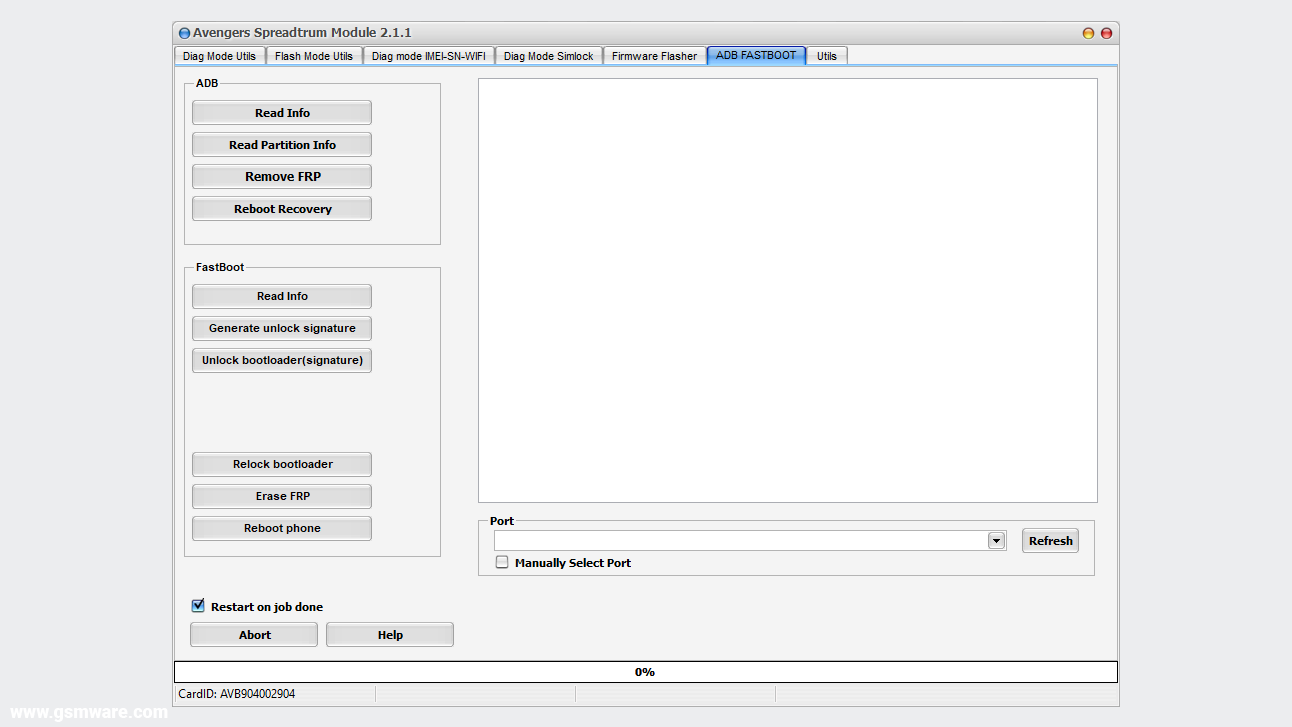
ADB Fastboot
- ADB
- Read Info
- Read Partition Info
- Remove FRP
- Reboot Recovery
- Fastboot
- Read Info
- Generate Unlock Signature
- Unlock Bootloader (Signature)
- Relock Bootloader
- Erase FRP
- Reboot Phone
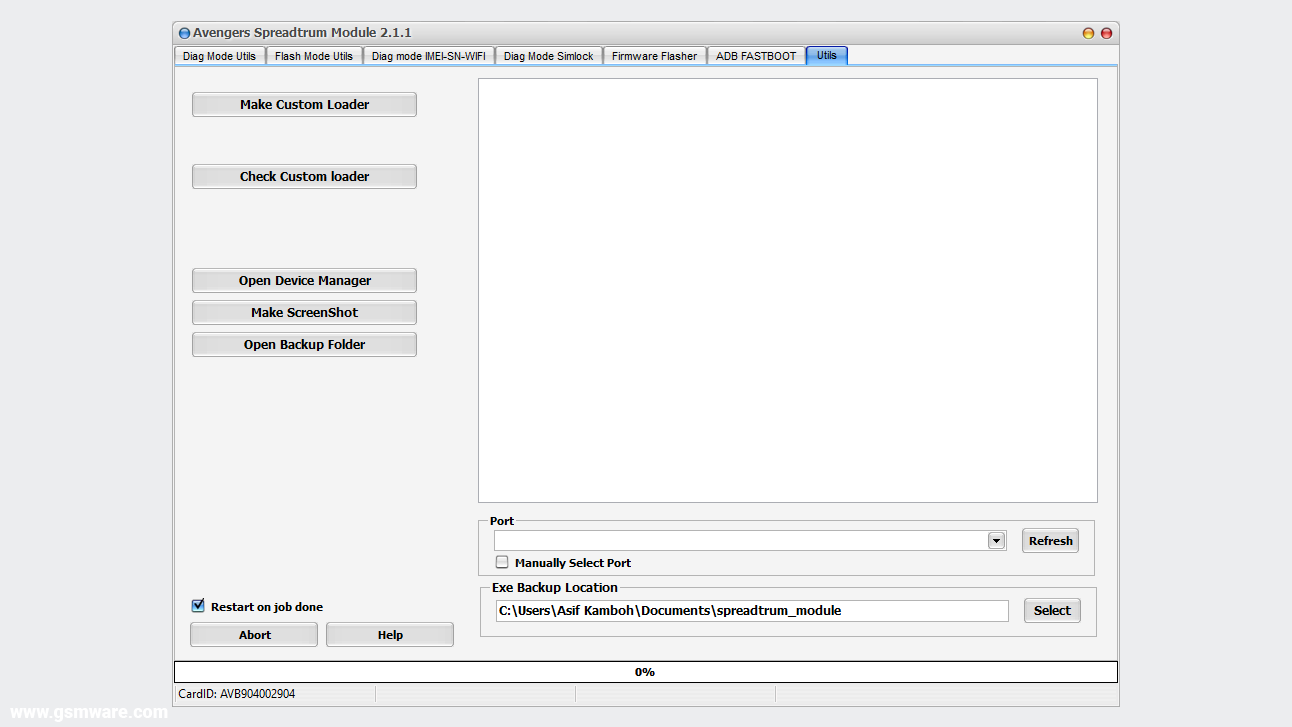
Utils
- Make Loader Package
- Check Custom Loader
- Open Device Manager
- Make ScreenShot
- Open Backup Folder
- Manually Select Exe Backup Location
How to install and use the avengers spreadtrum module?
If you want to use the Avengers Box SPRD module then you should be familiar with mobile software, CPU chips, flashing and unlocking process, Otherwise misusing this tool can break the software of your mobile device. And the guide to using this tool is very long, so now I'm going to teach you some easy ways to figure out how to install this tool and how to use it to unlock mobile phone.- First, you need to download the latest version from the link below, then extract the compressed file and install the program setup.
- Then install the Avengers box card drivers in your computer system according to your system Windows (x64 or x32) OS.
- Connect your Avengers box or dongle device to the computer, and launch the setup file from the desktop as administrator.
- Now you have to click on any button in the tool you want to act on, and then turn off your mobile device and connect to the computer. In some cases, you need to press your device's volume keys to boot into boot mode. Remember that you have your mobile drivers installed on your computer before you start flashing or unlocking.
Note: The program is virus-free and is scanned by Symantec Endpoint Protection Antivirus so that you can use it without fear.
Images of the avengers spreadtrum module.
You can see different images of this tool by sliding from the image slider below.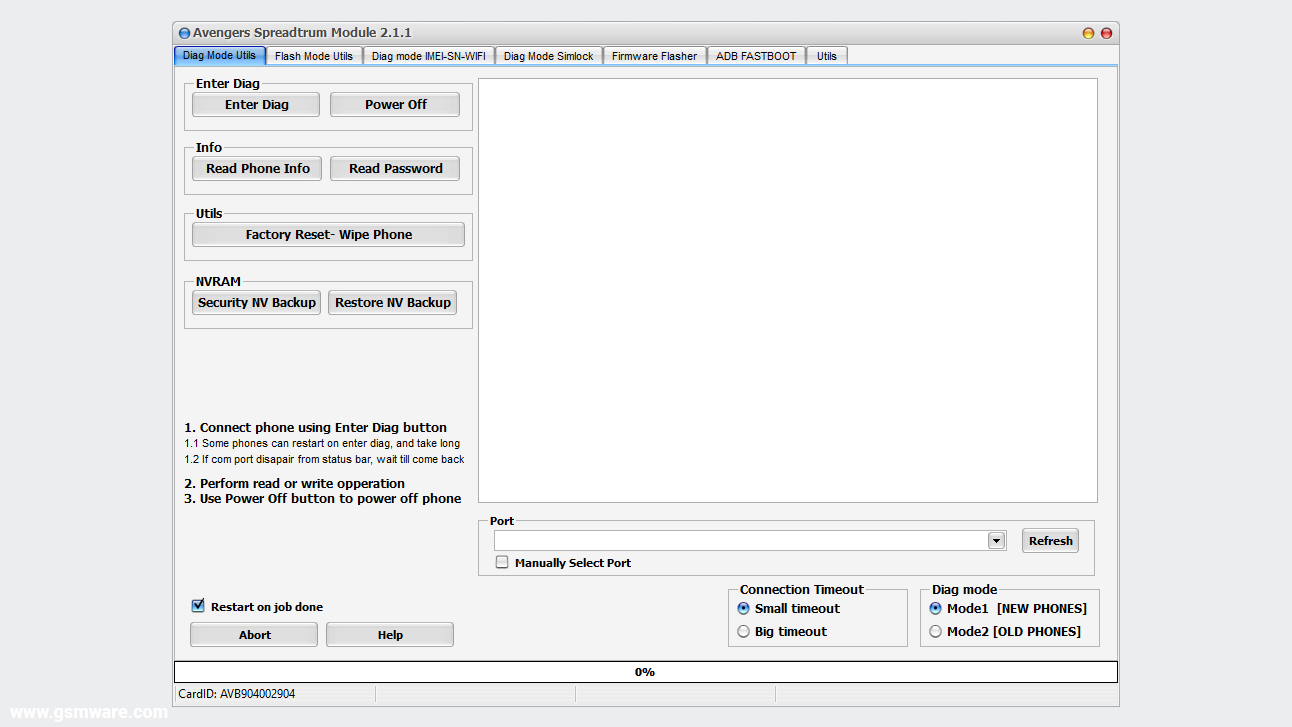


❮
❯
What are the contents of the avengers spreadtrum module files?
You can see each file's contents and its type from the content-box of the following file; in some cases, you have to move the scroll up and down to check all the file names and extensions.-AvengersBox_SPRD_Module_v3.0_Installer avenger_sprd_installer.exe -AvengersBox_SPRD_Module_v2.9.0_Installer avenger_sprd_installer.exe -AvengersBox_SPRD_Module_v2.8.0_Installer avenger_sprd_installer.exe -AvengersBox_SPRD_Module_v2.4.0_Installer avenger_sprd_installer.exe -AvengersBox_SPRD_Module_v2.3.6_Installer avenger_sprd_installer.exe -AvengersBox_SPRD_Module_v2.3.7_Installer avenger_sprd_installer.exe -AvengersBox_SPRD_Module_v2.3.8_Installer avenger_sprd_installer.exe -AvengersBox_SPRD_Module_v2.3.9_Installer avenger_sprd_installer.exe AvengersBox_SPRD_Module_v2.2.0_Installer avenger_sprd_installer.exe AvengersBox_SPRD_Module_v2.1.9_Installer avenger_sprd_installer.exe AvengersBox_SPRD_Module_v2.1.8_bugfix_Installer avenger_sprd_installer.exe AvengersBox_SPRD_Module_v2.1.7_Installer avenger_sprd_installer.exe AvengersBox_SPRD_Module_v2.1.6_Installer avenger_sprd_installer.exe AvengersBox_SPRD_Module_v2.1.5_Installer avenger_sprd_installer.exe AvengersBox_SPRD_Module_v2.1.4_Installer avenger_sprd_installer.exe AvengersBox_SPRD_Module_v2.1.3_Installer avenger_sprd_installer.exe AvengersBox_SPRD_Module_v2.1.2_Installer avenger_sprd_installer.exe -AvengersBox_SPRD_Module_v2.1.1_Installer avenger_sprd_installer.exe -AvengersBox_SPRD_Module_v2.0_Installer avenger_sprd_installer.exe -AvengersBox_SPRD_Module_v1.9_Installer avenger_sprd_installer.exe -AvengersBox_SPRD_Module_v1.8_Installer avenger_sprd_installer.exe -AvengersBox_SPRD_Module_v1.7_Installer avenger_sprd_installer.exe -AvengersBox_SPRD_Module_v1.6_Installer avenger_sprd_installer.exe -AvengersBox_SPRD_Module_v1.5_Installer avenger_sprd_installer.exe -AvengersBox_SPRD_Module_v1.4_Installer avenger_sprd_installer.exe -AvengersBox_SPRD_Module_v1.3_Installer avenger_sprd_installer.exe -AvengersBox_SPRD_Module_v1.2_Installer avenger_sprd_installer.exe -AvengersBox_SPRD_Module_v1.1_Installer 5003_read_info.jpg alcatel_5003_flashing.jpg avenger_sprd_installer.exe -Avengers Box SPD Module v0.6 avenger_sprd_installer.exe
Additional information of the avengers spreadtrum module.
You can find additional information about this tool in the table below. If you believe there is an error in any of the information provided in this post, you can let us know via the contact page or our email address contact.gsmware@gmail.com. We will be grateful to you for that.| Name | Information |
|---|---|
| Program | Avengers Spreadtrum Module |
| Type | .EXE (Installation Setup) |
| Version | 3.0 (Updated) |
| Size | 119.64 MB |
| Updated | Wednesday, 19 August, 2026 |
| Views | |
| Downloads | |
| Price | 79.00$ / 44.90$ |
| Developer | Avengers Box Team |
| Category | Box-Setup |
| Compatibility | Windows 7, 8, 10, 11 |
| Installation Password |
Copy |
| Archive Password |
Copy |
Download link of avengers spreadtrum module.
You can download the compressed RAR file of this tool from the link below and extract it with at least version 5.5 or later of the WinRAR program.| AvengersBox_SPRD_Module_v2.9.0_Installer.rar | 121.64 MB | |
| AvengersBox_SPRD_Module_v2.8.0_Installer.rar | 121.38 MB | |
| AvengersBox_SPRD_Module_v2.4.0_Installer.rar | 150.0 MB | |
| AvengersBox_SPRD_Module_v2.3.9_Installer.rar | 149.3 MB | |
| AvengersBox_SPRD_Module_v2.3.8_Installer.rar | 150.8 MB | |
| AvengersBox_SPRD_Module_v2.3.7_Installer.rar | 142.8 MB | |
| AvengersBox_SPRD_Module_v2.3.6_Installer.rar | 143.0 MB | |
| AvengersBox_SPRD_Module_v2.2.0_Installer.rar | 127.8 MB | |
| AvengersBox_SPRD_Module_v2.1.9_Installer.rar | 116.5 MB | |
| AvengersBox_SPRD_Module_v2.1.8_Installer.rar | 114.1 MB | |
| AvengersBox_SPRD_Module_v2.1.7_Installer.rar | 113.7 MB | |
| AvengersBox_SPRD_Module_v2.1.6_Installer.rar | 116.0 MB | |
| AvengersBox_SPRD_Module_v2.1.5_Installer.rar | 106.4 MB | |
| AvengersBox_SPRD_Module_v2.1.4_Installer.rar | 105.8 MB | |
| AvengersBox_SPRD_Module_v2.1.3_Installer.rar | 105.2 MB | |
| AvengersBox_SPRD_Module_v2.1.2_Installer.rar | 104.5 MB | |
| AvengersBox_SPRD_Module_v2.1.1_Installer.rar | 103.0 MB | |
| AvengersBox_SPRD_Module_v2.0_Installer.rar | 102.1 MB | |
| AvengersBox_SPRD_Module_v1.9_Installer.rar | 98.9 MB | |
| AvengersBox_SPRD_Module_v1.8_Installer.rar | 95.5 MB | |
| AvengersBox_SPRD_Module_v1.7_Installer.rar | 90.0 MB | |
| AvengersBox_SPRD_Module_v1.6_Installer.rar | 72.8 MB | |
| AvengersBox_SPRD_Module_v1.5_Installer.rar | 70.4 MB | |
| AvengersBox_SPRD_Module_v1.4_Installer.rar | 70.8 MB | |
| AvengersBox_SPRD_Module_v1.3_Installer.rar | 59.2 MB | |
| AvengersBox_SPRD_Module_v1.2_Installer.rar | 42.7 MB | |
| AvengersBox_SPRD_Module_v1.1_Installer.rar | 35.3 MB | |
| Avengers Box SPD Module v0.6.rar | 8.24 MB |
Changelog
- Phones added to supported list
- UCM TAB T12
- Oysterlabs UBS1
- Poco C71 Tiger T616 Ver2
- SPC Discovery 2 Tiger T606
- Inoi A151
- Itel A06(A669W)
- Itel P65
- Redmi A5 4G
- Tecno Spark Go 1(KL4)
- Realme C61 RMX3930
- Supported Operations:
- Read Info, Reset FRP, Factory reset, backup/restore security, read/write firmware, Diag operations (if firmware support), IMEI and SIMLOCK(not all models supported)
- Added/Fixed:
- Improved phone flashing.
- Improved custom loader building.
- Fixed repartition bug what come in some phones.
- Added auto metod to flash realme phones(it little differ from normal)
- Improved write phone nvram
- Improved security backup before flash(added splloader backup)
- Infinix:
- SMART 10 X6725
- Tecno:
- POP 9 KL4
- ZTE:
- Zte Blade A35e
- Zte Optus X Vista Z6621O
- Zte blade a35
- PHILIPS:
- Essence S21
- Nokia:
- c12
- Lava:
- Yuva 2 (LZX4110)
- Supported Operations:
- Read Info, Reset FRP, Factory reset, backup/restore security, read/write firmware, Diag operations (if firmware support)
- Added/Fixed:
- GUI style change.
- Improved booting for supported models UFS filesystem
- Improved super partition parsing (exe will read extends information also for including partitions)
- Improved frp reset for phones with UFS filesystem
- Blackview:
- Blackview A52 Pro
- Blackview A85
- Blackview BV4800 Pro
- Blackview Oscal C70
- Blackview Oscal C80
- Blackview Oscal Tiger 10
- Blackview Wave 8
- Oukitel:
- Oukitel C1 Pro
- Oukitel C32
- Oukitel C33
- Oukitel C36
- Oukitel C51
- Oukitel C58
- Oukitel C58 Pro
- Oukitel C59
- Oukitel C60
- Oukitel C62
- Oukitel C62 Pro
- Oukitel C65
- Oukitel C65 Pro
- Oukitel G1
- Oukitel G2
- Oukitel OT11
- Oukitel OT12
- Oukitel RT9
- Oukitel WP23 Plus
- Oukitel WP23 Pro
- Oukitel WP28 E
- Oukitel WP28 S
- Oukitel WP32 Pro
- Supported Operations:
- Read info, wipe/factory reset, reset FRP, backup/restore security, read/write flash, Diag mode wipe, Diag mode read info, repair IMEI, Diag mode repair sn.
- Added/Fixed:
- Fixed bug with reading partition info.
- Improved security backup function (was dropped for some models)
- Improved frp reset for new android version
- ZTE:
- Boot information, backup & restore NVRAM, firmware backup & restore, remove FRP, factory reset, unlock sim, repair IMEI, write pac firmware.
- Blade A5 2020
- P600
- P651 2021
- BLU:
- Boot information, backup & restore NVRAM, firmware backup & restore, remove FRP, factory reset, unlock sim, repair IMEI, write pac firmware.
- Blu j7l
- Symphony:
- Boot information, backup & restore NVRAM, firmware backup & restore, remove FRP, factory reset, unlock sim, repair IMEI, write pac firmware.
- Symphony i69
- Hurricane:
- Boot info, backup & restore NVRAM, firmware backup & restore, remove FRP, factory reset, sim unlock, repair IMEI, write pac firmware.
- Hurricane pulse V04
- Altice:
- Boot info, backup & restore NVRAM, firmware backup & restore, remove FRP, factory reset, sim unlock, repair IMEI, write pac firmware.
- Altice S62
- Movitel:
- Boot info, backup & restore NVRAM, firmware backup & restore, remove FRP, factory reset, sim unlock, repair IMEI, write pac firmware.
- Movitel M9106
- Mobicel:
- Boot info, backup & restore NVRAM, firmware backup & restore, remove FRP, factory reset, sim unlock, repair IMEI, write pac firmware.
- Mobicel GLO
- BOLD:
- Boot info, backup & restore NVRAM, firmware backup & restore, remove FRP, factory reset, sim unlock, repair IMEI, write pac firmware.
- BOLD T0040TT
- Sky:
- Boot info, backup & restore NVRAM, firmware backup & restore, remove FRP, factory reset, sim unlock, repair IMEI, write pac firmware.
- Sky elite octa us2
- Itel:
- Boot info, backup & restore NVRAM, firmware backup & restore, remove FRP, factory reset, sim unlock, repair IMEI, write pac firmware.
- Itel AC13(W4001)
- A44 Air(L5502)
- Hisense:
- Boot info, backup & restore NVRAM, firmware backup & restore, remove FRP, factory reset, sim unlock, repair IMEI, write pac firmware.
- Hisense U964
- Tecno:
- Boot info, backup & restore NVRAM, firmware backup & restore, remove FRP, factory reset, sim unlock, repair IMEI, write pac firmware.
- Tecno BD2p
- Fixes & Improvements:
- Improved simlock detection for supported phones.
- Improved NVRAM structure detection for supported phones.
- Added info to exe log about loader CPU and first 16 bytes of public RSA key used to sign phone loader.
- In this way, it will be easier to check phones compatibility with loaders.
- Improved IMEI repair for supported Android phones.
- Nokia: - (EXCLUSIVE)
- Read boot info, backup/restore NVRAM, read user code, write PAC firmware, factory reset (Nokia 105 in Diag mode).
- Nokia 105 (TA-1174)
- Nokia 105 (TA-1203)
- Nokia 3310 (TA-1022)
- Nokia 3310 (TA-1006)
- Alcatel:
- Read boot info, backup/restore NVRAM, read user code, write PAC firmware, read full flash, restore firmware, factory reset in diag mode. Firmware updated (uploaded) in the support area.
- OT-2019G
- OT-2053X
- OT-2053D
- OT-1054 - Read SIM unlock code; all other functions are already supported.
- OT-2051 - Read SIM unlock code; all other functions are already supported.
- Tecno:
- Read boot info, backup & restore NVRAM/firmware, remove FRP, factory reset, SIM unlock, repair IMEI, write PAC firmware.
- Pop 2x Air (RB6S)
- Pop 2x (RB7S)
- Pop 2x Plus (RB8S)
- Pop 2F (B1G)
- Pop 4 (BC2C)
- Pop 5 (BD2)
- Realme:
- Read boot info, backup/restore NVRAM, remove FRP, factory reset, write PAC firmware.
- Realme C11 2021
- Lava:
- Read boot info, backup & restore NVRAM/firmware, remove FRP, factory reset, SIM unlock, repair IMEI, write PAC firmware.
- Lava Z41
- Lava Z53
- Itel:
- Read boot info, backup/restore NVRAM, remove FRP, factory reset, SIM unlock, repair IMEI, write PAC firmware.
- Itel A41 plus
- Micromax:
- Read boot info, backup/restore NVRAM, remove FRP, factory reset, SIM unlock, repair IMEI, write PAC firmware.
- Micromax Q402
- BQ Mobile:
- Read boot info, backup/restore NVRAM, remove FRP, factory reset, SIM unlock, repair IMEI, write PAC firmware.
- BQ 1082G
- Condor:
- Read boot info, backup/restore NVRAM, remove FRP, factory reset, SIM unlock, repair IMEI, write PAC firmware.
- Condor T9
- Prestigio:
- Read boot info, backup/restore NVRAM, remove FRP, factory reset, SIM unlock, repair IMEI, write PAC firmware.
- Prestigio PMT4137 4G
- Hurricane Mobile:
- Read boot info, backup/restore NVRAM, remove FRP, factory reset, SIM unlock, repair IMEI, write PAC firmware.
- Hurrican Iris Plus 2021
- STYLO:
- Read boot info, backup/restore NVRAM, remove FRP, factory reset, SIM unlock, repair IMEI, write PAC firmware.
- STYLO DFM46
- Added:
- Alcatel: OT-5030 (A, D, F) - Added support for Simunlock and Repair IMEI; other functions already supported.
- Generic SPRD:
- Added Simunlock for phones with sm9863a, sc7731e, sc9832e CPU and Android 10 support for IMEI repair.
- Additional:
- Users need to select a Generic CPU and Loader named Simlock from the list.
- Unlocking or repairing IMEI will only be performed in Flash mode.
- In DIAG Mode will NOT WORK, will give not supported sim lock.
- Only phones with the default sign key are supported.
- Phones with different RSA will not work (ZTE, MOTOROLA, NOKIA).
- Added possibility to write firmware which read from a phone.
- This function is beta, needs to be used with caution.
- Avoid flashing the wrong firmware in the phone; a PAC file will be required to work after such a phone.
- Flash mode improved SIM lock and repair IMEI, support for Android 10.
- Fixed not working Reset EFS for sc6530, 6531 phones.
- Updated making loader function(utils tab).
- Now must handle correctly loader info for android 10 or 11.
- Exe will not freeze not on making loader.
- Added sim unlock support for PIKE2 Shuttle phones(beta).
- Was reported by some used on BLU L5 phone.
- Possible more phones have this simlock modification.
- Updated simlock detection, must be more universal now.
- The following are some new models added: Supported write firmware, reset frp, backup/restore nv, backup/restore security, reset phone, simunlock (on some phones can not work)
- ZTE 8010
- ZTE A7020RU
- QMobile Fire
- Itel A48 (L6006L)
- WIKO W-K130-TMV
- Symphony i68
- Symphony i98
- Symphony V99+
- Cherry SuperionS2
- Blu C5L
- Blu C6 2019
- Blu G5, G8
- Blu G5 Plus
- Blu G6
- Blu G60
- Blu U851
- Blu L5
- INOI 2 2021
- INOI 2 Lite 2021
- INOI 5 2021
- INOI 5 Lite 2021
- INOI 7 2020
- Blackview Tab8
- ulefone Note 10
- IRBIS TZ718
- hisense U40


29 comments
Pass word crack
ReplyDeleteThis post contains the official setup files of the Avengers Box SPD Module and their password is: www.gsmware.com
DeletePassword please
DeletePassword: www.gsmware.com
Deletehow do i handle missing smart card error
ReplyDelete1. Install the Avengers Box USB driver on your computer.
Delete2. Then install Avengers Box Main Module.
3. Connect your Avengers Box/Dongle device to the computer.
4. Now launch the Avengers Box Main module and update/activate your box/dongle card firmware.
5. After completing the above process, you can use any Avenger Box tool on your computer.
Is it cracked
ReplyDeleteNo sir, this post contains the official installer setup files of the Avengers SPRD Module.
DeleteWhere's the download link??
ReplyDeleteWatch this video to learn how to download tools from GSMWARE site.
Delete:youtube:XBWPbeYvfqA:eyoutube:
thanks
ReplyDeleteYou are more than welcome!
DeleteWhat do when its says [01] Missing smart card, please insert vaild smart card!
ReplyDeleteThese are the official installation setup files of the Avengers Box SPRD Module. If you want to use it, you will need an Avengers Box or dongle device, which after connecting to the computer, you will need to install the Avengers Box USB drivers.
DeleteWhere can i buy an Avengers box or dongle device?
DeleteYou can buy all GSM-related tools from gsmserver.com.
Deletehow can i get smart card
ReplyDeleteYou can buy smart card (avenger box or dongle) from gsmserver.com.
DeletePassword pls
ReplyDeletePassword: www.gsmware.com
DeletePassword please
ReplyDeletePassword: www.gsmware.com
DeleteI have Huawei y9 prime 2019 now its locked i want unlock without losing data plz help me
ReplyDeleteThank you for your comment. Both the ISP pinout method and the eMMC Socket method are viable options for unlocking your phone without losing user data.
DeleteThe ISP pinout method is a more invasive procedure, as it requires physically removing the phone's motherboard and connecting it to a special device that can read and write data to the phone's memory. This method is generally only recommended for experienced technicians, as it carries a risk of damaging the phone if not done correctly.
The eMMC Socket method is a less invasive procedure, as it does not require physically removing the phone's motherboard. Instead, a special adapter is inserted into the phone's SIM card slot, which allows the phone to be connected to a special device that can read and write data to the phone's memory. This method is generally easier to perform than the ISP pinout method, and it carries a lower risk of damaging the phone.
Which method you choose will depend on your own level of experience and comfort with working on phones. If you are not comfortable working on phones, or if you are concerned about damaging your phone, I recommend taking it to a qualified technician.
bhai please is template ka name batana jo aap ne use kiya howa hai
ReplyDeleteGood
ReplyDeleteam lost still it say missing card
ReplyDeleteBro the download isn't starting i have tried hundreds of times 😕
ReplyDeleteThanks for letting me know bro, the download link has been updated and is now fixed, please try again, this time it should work perfectly 😊.
DeletePost a Comment